ittle minds like to see the world in simple black and white. What they often forget is that, at first glance, many things only appear to work so smoothly because highly complex systems are operating behind the scenes. Need an example?
Power outlets. You plug something in and electricity comes out. Chances are you've never thought about the fact that your laptop consumes 65 watts while your electric kettle draws 2,000 watts. Yet your electricity provider bills it all together. How exactly they generate the power, feed it into the grid, and deliver it to your home? Who knows...
The entire system—from power generation and distribution to consumption and billing—only works because everyone involved has agreed on standards that make buying electricity as simple as possible for the end customer.
In e-commerce, OCI PunchOut combined with Shopware creates a setup that is remarkably similar to a power outlet: in an enterprise environment, customers can purchase, pay for, and manage products with ease, while complex processes run in the background without them noticing. Without these processes, however, the entire system would collapse like a house of cards in the wind.
In this article, we'll explain how OCI PunchOut works, why it's quickly becoming a must-have in B2B, and how the system can be integrated into your Shopware store.
Let's start with the most fundamental question.
OCI PunchOut: What Exactly Is It?
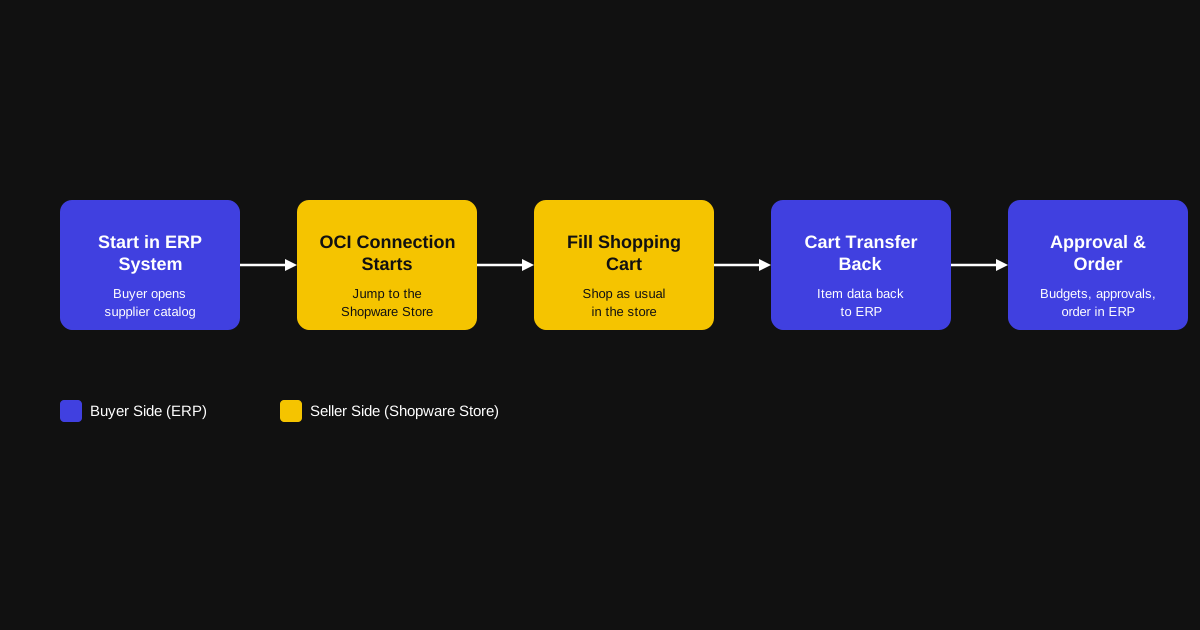
OCI PunchOut originates from B2B e-procurement and is a process and communication standard for exchanging shopping carts between two systems. "OCI" stands for Open Catalog Interface. The idea behind the system, originally developed by SAP, is simple:
Instead of purchasing directly from a supplier's online store, a company starts the purchasing process from within its own ERP or procurement system. From there, the user is transferred to the supplier's online shop and adds products to the shopping cart as usual.
This is where the PunchOut happens: instead of completing the purchase within the online store, the filled shopping cart is transferred back to the buyer's ERP system. Approval workflows, budget checks, and the actual purchase order are then handled entirely within that system.
Or, as a simplified process overview:
- A purchaser opens a supplier catalog in SAP, Ariba, or Coupa.
- The system initiates an OCI connection.
- The user is transferred to the supplier's online shop.
- They shop as usual.
- Instead of clicking "Buy Now," they click "Transfer Shopping Cart."
- The item data is sent back to the ERP system.
- The company creates the purchase order internally.
The clever part is that users feel as though they're shopping directly in the online store—with all the convenience that comes with it.
Reading tip: A great search function also plays a key role in making an online store convenient to use. In another article, we explain how to integrate the Nosto Search Engine into your Shopware store.
At the same time, however, the entire purchasing process remains within the company's official procurement workflow.
Why is that such a clever approach? Because it offers a wide range of advantages.
Why Enterprise Customers Love Purchasing via PunchOut
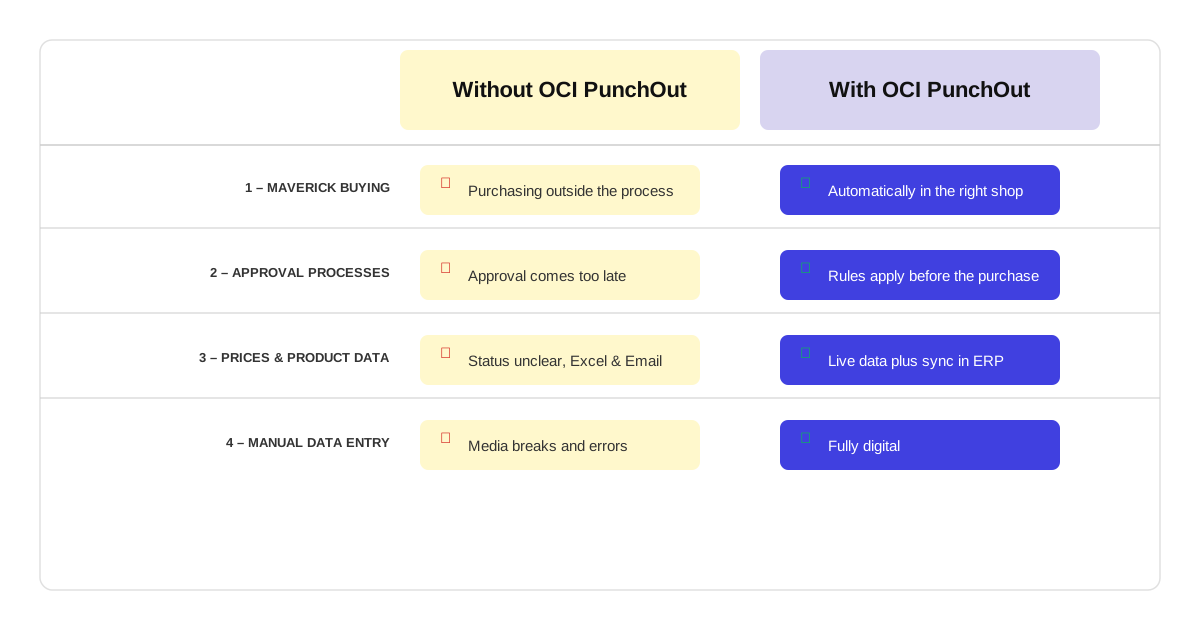
PunchOut provides companies with a structured procurement framework and can significantly simplify internal purchasing processes.
To give you an idea of why large companies rely so heavily on PunchOut, let's take a look at the biggest advantages.
#1: Less Maverick Buying
Maverick buying refers to employees making purchases outside the company's official procurement channels. In practice, it looks something like this:
Without OCI PunchOut
A murmur spreads through the department. The last pack of printer paper has just been opened.
The eager new hire immediately rushes to their computer to order more paper from Amazon. Meanwhile, the experienced colleague has already picked up the phone to call the local office supply store. Buy local.
Two days later, not only does enough printer paper arrive to last for the next eight years—but, more importantly, the manager completely loses their temper. The team had entirely forgotten that the company already has framework agreements with a wholesaler, including negotiated discounts, service level agreements, and fixed payment terms.
With OCI PunchOut
Employees start their purchasing process from within the company's own ERP system and are automatically directed to the correct supplier's online shop—in this case, the wholesaler's store.
There, they not only see all negotiated conditions; the ERP system can even notify the experienced employee that the eager new hire has already ordered more than enough paper.
This allows the company to maintain full control without having to send someone from procurement every time the office runs out of paper.
It saves time, reduces frustration, and, more often than not, saves a considerable amount of money.
#2: Approval Workflows Remain Intact
Spending someone else's money is always easier than spending your own. That's true for public authorities—and for companies as well.
That's why budgets often require approval before purchases can be made.
Here's what that looks like:
Without OCI PunchOut
An employee buys something, and a few days later the invoice lands on the manager's desk.
Only then does the manager realize that a purchase was made in the first place.
By then, it's too late for a proper approval process. The only options left are to reluctantly accept the purchase or go through the hassle of cancelling it.
Meanwhile, the employee quietly celebrates because the new laptop has enough power to double as a gaming machine after work.
With OCI PunchOut
Before the purchase is completed, the shopping cart is transferred back to the company's ERP system.
There, automated approval rules can take effect, for example:
- Purchases over €500 → Team leader approval
- Hazardous materials → Compliance approval
- IT hardware → IT department review
The company therefore controls not only where purchases are made, but also when they are made and who approves them.
And since a gaming laptop falls under IT hardware, the IT department will quickly put an end to that idea.
#3: Prices and Product Data Always Stay Up to Date
As a B2B professional, you probably know how complex B2B commerce can be.
Prices are negotiated individually for each customer, sophisticated discount structures are common, and many products are available in countless variants.
This often leads to the following situation:
Without OCI PunchOut
Without PunchOut, B2B orders often become chaotic—even if a dedicated online store with personal customer access already exists.
After all, when thousands of orders are placed every day, mistakes are inevitable.
Maybe someone has forgotten their login credentials, or simply forgotten that an online shop even exists.
So they dig out an old Excel spreadsheet and send the order by email because the order simply has to go out.
Are the prices still current? Is the product even still available? Were all customer-specific discounts applied correctly?
Nobody really knows.
With OCI PunchOut
With PunchOut, buyers always see the current version of the supplier's online store.
Remember: although the purchasing process starts in the company's ERP system, the shopping cart is filled within the supplier's online store using live data.
Prices, delivery conditions, packaging units—everything reflects the data currently used by the supplier.
Once the shopping cart is transferred back to the ERP system, an additional automated validation can take place.
Do all values match the information stored internally?
Or has the delivery time suddenly increased by two days compared to what was contractually agreed?
If discrepancies are detected, the system issues a warning so the company can respond accordingly.
#4: Less Manual Data Entry
Manual processes are always slow and prone to errors in e-commerce.
That means:
Without OCI PunchOut
Without a direct connection between the online store and the ERP system, countless pieces of information have to be transferred manually.
This could be an incoming invoice that accounting has to process, or a notification to the warehouse that goods are on their way and storage space needs to be reserved.
While some of these processes can be digitized—for example through electronic invoicing—not everything can.
As a result, media disruptions are inevitable.
Because these manual transfers are so error-prone, they require a great deal of care and constant monitoring.
Even then, mistakes are almost unavoidable.
With OCI PunchOut
As we've already seen, PunchOut transfers the shopping cart directly into the ERP system, where it continues through the process entirely digitally.
Data is transferred one-to-one within milliseconds and is immediately available to every relevant department: accounting, warehouse operations, compliance, and beyond.
There are no more media disruptions—and therefore no unnecessary errors, corrections, or delayed processes.
Reading tip: EDI vs. OCI PunchOut—these two concepts are often confused, but they are definitely not the same. In another article, we explain the details of Electronic Data Interchange.
Shopware B2B x OCI PunchOut: How the Implementation Works
By now, it should be clear why large companies prefer to handle their procurement via OCI PunchOut—it is secure, convenient, reduces errors, and enables a wide range of automations that simply wouldn't be possible otherwise.
In fact, we'd even go one step further and say: for many B2B stores, OCI PunchOut is the ticket into the big league. If the integration isn't available, the largest customers often lose interest immediately.
So let's answer the questions that will make you PunchOut-ready.
Which Companies Benefit from OCI PunchOut?
Not every B2B store benefits from PunchOut.
If you only offer a small range of standardized products, supply only a handful of selected customers, or sell to industries that are still not very digitally mature, the added value quickly becomes limited.
On the other hand, PunchOut is particularly well suited for:
- Manufacturers
- Wholesalers
- Technical distributors
- Industrial suppliers
- Companies working with framework agreements
As a general rule, the more technical your products are and the more complex your customers' procurement organization is, the greater the benefits of PunchOut tend to be.
How Do You Make a Shopware Store PunchOut-Ready?
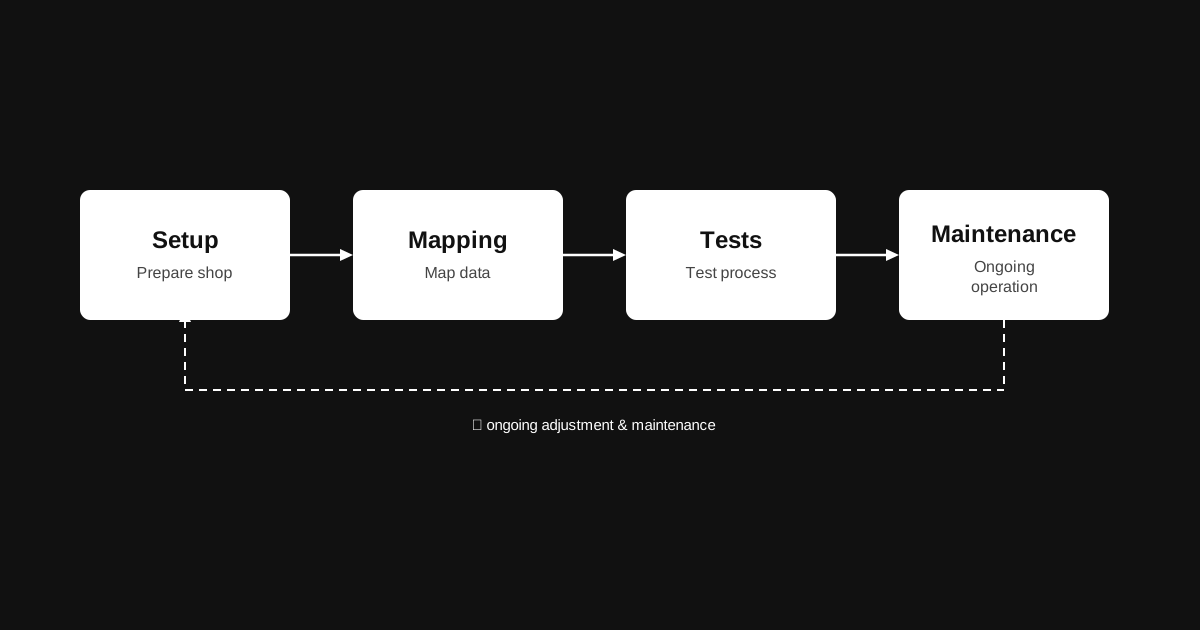
First things first: PunchOut is not a plugin or a feature that you simply enable in your shop.
It is a permanent system integration whose implementation always consists of a combination of setup, mapping, testing, and ongoing maintenance.
Let's take a closer look at what each of these steps involves.
Setup: Shopware and PunchOut
The setup phase creates the technical and procedural foundation required to integrate your Shopware store into an external procurement system via PunchOut.
Although the Shopware Store offers plugins and extensions that provide the technical basis for an OCI connection, these only represent the foundation for the later communication. They do not provide a complete end-to-end integration.
In practice, this means that your online store is first prepared as a PunchOut-enabled storefront capable of supporting external procurement processes from a technical perspective.
The real complexity only begins when this storefront is connected to the downstream software layers.
This also includes integrating your own ERP system, which serves as the leading system for prices, product availability, customer-specific conditions, and inventory logic.
Within this setup, the online store essentially becomes an interactive user interface inside someone else's procurement process.
The setup therefore defines not only the external interfaces but also the overall system architecture: the online store as the frontend and the ERP system as the central hub for data and business processes.
Reading tip: Is your business running on Microsoft Dynamics NAV (Navision), and is the shop integration causing problems? We explain how to successfully connect it to Shopware.
Mapping
Mapping is one of the most critical—and at the same time one of the most frequently underestimated—parts of a PunchOut integration.
It describes the structured assignment of data between the shop system, the ERP system, and the customer's procurement platform.
This is about far more than simply matching technical fields. Above all, it is about ensuring semantic consistency.
Which piece of information in the online shop corresponds to which field in the customer's ERP system?
How are prices, product numbers, units of measure, or delivery information interpreted consistently across all connected systems?
For example, an internal SKU becomes an ERP item number, a gross price becomes a customer-specific net price, or a delivery time is converted into a standardized field within the procurement system.
In practice, data quality often turns out to be the decisive success factor.
Incomplete product master data, inconsistent unit structures, or pricing models that have evolved over many years frequently cause integration problems that cannot be solved technically—they can only be solved by improving the underlying data.
The more complex your product portfolio and the more individual your customer-specific conditions are, the more the effort shifts away from technical implementation and toward data harmonization.
Clean mapping is therefore far less a one-time configuration than a structural prerequisite for stable PunchOut processes.
Testing
The testing phase serves to validate the complete end-to-end process under real-world conditions.
This includes not only verifying the technical transfer of the shopping cart but also testing the entire workflow—from launching the purchasing process in the customer's procurement system to transferring the shopping cart back into the customer's ERP.
Particular attention is paid to data consistency, system compatibility, and process stability across different customer scenarios.
Different ERP and procurement systems often interpret identical data fields in different ways.
For that reason, it is not enough if your store successfully passes a single internal test.
The most common issues arise where systems interact with one another—for example:
- Missing or incorrectly interpreted fields
- Deviating prices
- Incorrect conversions of units of measure
- Faulty product structure mappings
(Have we mentioned how important data quality is?)
A professional testing strategy therefore includes far more than the so-called happy path—the ideal scenario in which everything works exactly as intended and everyone knows what they're doing.
It also covers variations, exceptional cases, and, of course, the infamous "user who does the unexpected."
Maintenance
Once the system goes live, a PunchOut integration is no longer a completed project but a permanently operated system—much like a machine in a factory that not only needs to be switched on but also continuously monitored.
In this context, maintenance primarily means ensuring long-term stability across systems and over time.
Since both your Shopware store and your ERP system are (hopefully) continuously evolving, new adjustments to the interface setup, data mapping, and business rules regularly become necessary.
Even small changes within the store—for example to pricing structures, product variants, or product data—can have an impact on the entire downstream procurement process.
Then there's another factor to consider: your customer's systems.
An update to their procurement platform, new master data in their ERP, or special conditions with a logistics provider may all require adjustments to the integration.
Maintenance therefore goes beyond technical updates. It also includes the ongoing refinement of the integration logic and continuous monitoring of process stability during day-to-day operations.
Conclusion: OCI PunchOut x Shopware B2B
At first glance, PunchOut primarily benefits your customers.
Their procurement processes become more stable, more integrated, and more reliable.
For you, on the other hand, it mainly means one thing: a significant amount of work.
However, that effort has its own value. In today's connected business world, OCI PunchOut is often the key that opens the door to major enterprise customers.
Just don't forget that work on a PunchOut system is never truly finished.
That means you'll either need an experienced in-house IT team or a Shopware agency that can support you not only during the implementation but also over the long term.
If you'd like to see what that can look like, take a look at our Shopware page.
There you'll find numerous projects that we continue to support to this day—including PunchOut integrations.
If you're looking for entirely different features for your e-commerce store, be sure to explore our services as well. After all, digital procurement is far from the only thing we do.
Unlike a power outlet.
Despite all the hidden complexity behind it, it can still only do one thing: supply electricity.
FAQ: Shopware B2B x OCI PunchOut
What is the difference between OCI PunchOut and a traditional online shop order?
With a traditional online shop order, the purchase is completed directly within the online store.
With OCI PunchOut, however, the purchasing process starts in the customer's ERP or procurement system.
Although users add products to the shopping cart within the supplier's online store, the shopping cart is then transferred back to the procurement system.
Approval workflows, budget checks, and the actual purchase order all continue there.
Which companies benefit most from an OCI PunchOut integration?
OCI PunchOut is particularly beneficial for manufacturers, wholesalers, technical distributors, and industrial suppliers with complex B2B procurement processes.
As a general rule, the more individual the customer conditions, product portfolio, and purchasing workflows are, the greater the value of a PunchOut integration.
Is a Shopware plugin enough to use OCI PunchOut?
No.
Although the Shopware Store offers plugins that provide the technical foundation for an OCI connection, a complete PunchOut integration involves much more.
This includes connecting the ERP system, data mapping, extensive testing, and the long-term maintenance of the entire integration landscape.
Why is data quality so important for OCI PunchOut?
For products, prices, delivery information, and item numbers to be exchanged correctly between the online store, ERP system, and procurement platform, the underlying data must be consistent and well maintained.
In practice, many integration issues are not caused by the technology itself but by incomplete or inconsistent master data.
How much maintenance does an OCI PunchOut integration require?
OCI PunchOut is not a one-time implementation project but a permanently operated system.
Changes to Shopware, the ERP system, pricing structures, product data, or customers' procurement platforms can all require adjustments.
For this reason, companies should regularly monitor and maintain their integration—or have an experienced partner do so—to ensure stable long-term operation.