he Miracle of Bern is familiar even to people who aren't particularly interested in football. But have you heard of the Miracle of Istanbul? In the 2005 Champions League final, Liverpool faced AC Milan. At half-time, the English side were 3–0 down. But then manager Rafael Benítez made a tactical change, bringing Dietmar Hamann into midfield. It completely changed the dynamics of the game: all of a sudden, defence and attack worked together much more effectively. The Reds came back to level the score and eventually won the title on penalties.
Great story. But what does any of this have to do with e-commerce? Here's the thing: you can have two systems that work perfectly well on their own – attack and defence in football, ERP and storefront in e-commerce. But if they don't work together, you can still lose the game.
Your store and ERP system only deliver their full value when information and processes flow smoothly between them. That's why, in this article, we're taking a closer look at the connection between Shopware and Microsoft Dynamics 365 Business Central: How does it work? What actually happens behind the scenes? And most importantly: what benefits can you, as a B2B retailer, gain from it?
Let's Start with the Basics:
Shopware and Microsoft Dynamics 365 Business Central: What Are They?
Shopware is a commerce platform that enables businesses to create digital shopping experiences for both B2C and B2B customers. Especially in the B2B space, Shopware offers a wide range of options for handling complex requirements, such as customer-specific pricing, individual product assortments, and different customer groups.
Some of the system's key strengths include:
- Flexible customisation options for different business models
- Extensive B2B features for business customers
- A modern architecture with powerful APIs
- Good scalability for growing businesses
- Extensibility through apps and integrations
Shopware is therefore the place where your customers interact with your business – essentially, the window into your product world.
Microsoft Dynamics 365 Business Central is an ERP (Enterprise Resource Planning) system from the Microsoft ecosystem. It helps businesses manage their core processes, from finance and purchasing to inventory, logistics, sales, and project management.
The solution is primarily aimed at mid-sized businesses that want to structure and continuously improve their business processes. Business Central is particularly interesting for companies that already work with Microsoft technologies and use tools such as Microsoft 365, Teams, or Power BI.
Some of the key benefits of Business Central include:
- Powerful financial and inventory management
- Centralised management of key business data
- Support for complex business processes
- Strong reporting and analytics capabilities
- Integration with the Microsoft ecosystem
- International capabilities for growing businesses
Business Central is therefore not an e-commerce platform, but the commercial and operational foundation running behind the scenes.
Recommended reading: In established businesses, you may not be working with a Dynamics ERP at all, but with Microsoft's legacy solution, MS Navision. We show you how to connect Shopware in this environment as well.
The Big Question: Why Connect the Two Systems in the First Place?
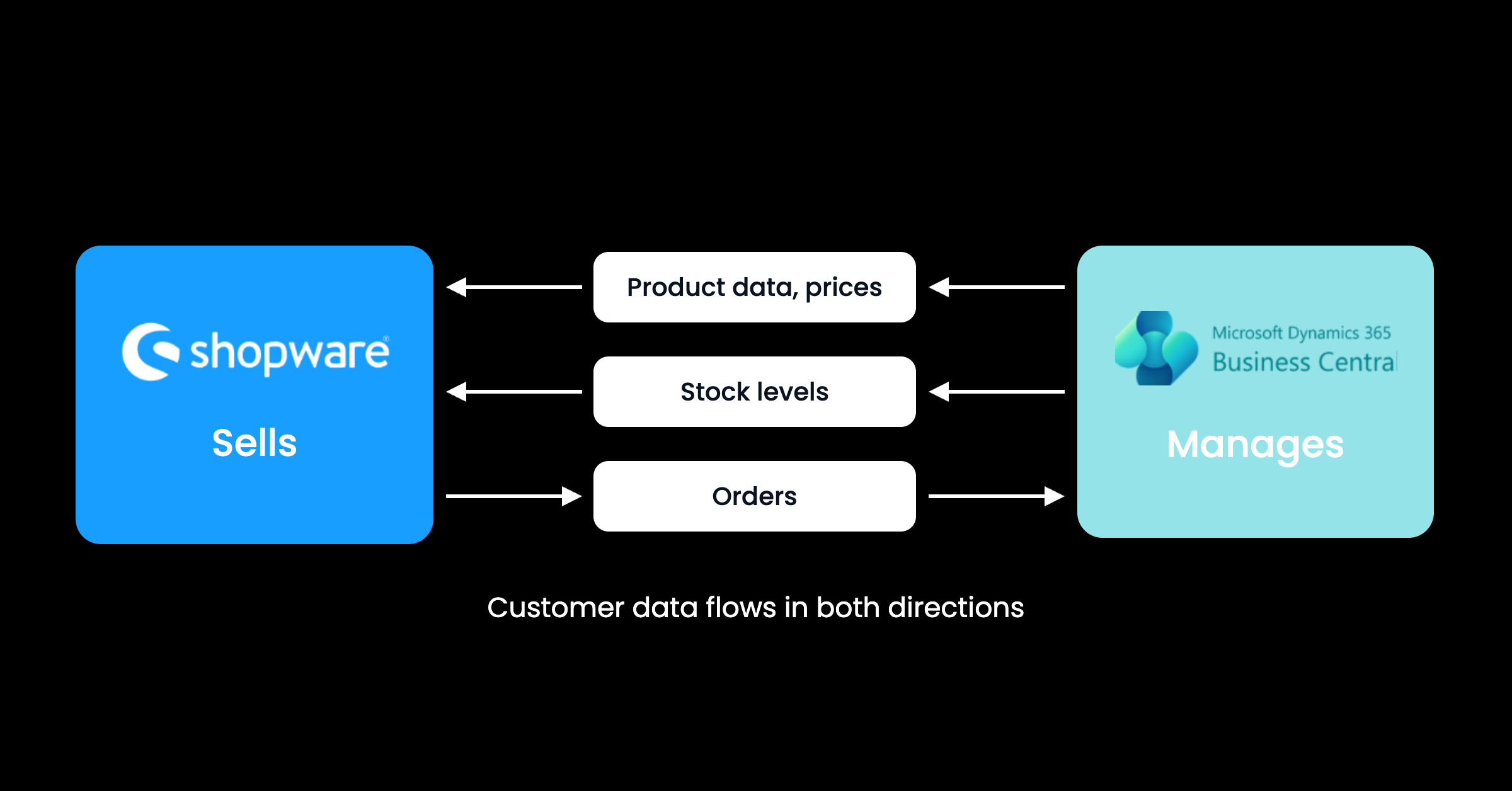
In practice, we're dealing with two completely different platforms. One sells, the other manages. And yet, it's obvious that the ERP and the storefront often rely on the same underlying data – or that a value in one system depends on what's happening in the other.
The shop needs the current price of a product in order to sell it in the first place. But the ERP needs this information for finance and accounting as well. When a product is sold through the store, this affects inventory levels – a value that is managed in the ERP.
Without a connection between the two, manual steps quickly become necessary: employees transfer orders from the shop to the ERP, update prices in multiple systems, or manually reconcile inventory levels. As the product range grows, order volumes increase, and B2B requirements become more complex, this effort only gets bigger.
An integration, on the other hand, creates a shared data foundation. Information flows automatically back and forth between Shopware and Business Central. This eliminates breaks between systems and reduces errors, while improving both efficiency and scalability.
Connection: How Does the Integration Between Shopware and MS Dynamics Work?
As an ERP, Microsoft Dynamics 365 Business Central is a closed system. Communication with the outside world – such as an online shop – therefore does not happen directly, but through APIs. These connections allow data to be exchanged between systems as needed. In most cases, the ERP defines the framework that the rest of the integration needs to work within.
In practice, it's often easier to make changes to the comparatively manageable shop system than to the monolithic ERP giant. There are two basic approaches to the technical implementation:
Direct Customisation in the Shop
The online shop is developed or extended to work with Business Central's APIs and data structures.
Integration via Middleware
An additional software layer handles communication between Shopware and Business Central. It can translate, adapt, and distribute data between the systems. This approach is particularly useful for more complex requirements, for example when additional systems such as PIM, CRM, or marketplaces also need to be connected.
Recommended reading: Similar to an API, but different: EDI describes the standardised, automated exchange of business documents directly from one company system to another. We explain how your business can benefit from it.
Great, But … What Are the Benefits of Integration for B2B Retailers?
So far, we've talked a lot about data. By now, you know that a consistent data set between ERP and storefront eliminates breaks between systems and therefore reduces errors, puts an end to inefficient manual work, and improves the scalability of your system landscape.
But data is only the beginning. Information alone doesn't create value. What really matters is what a company does with that information: when implemented correctly, an integration between Shopware and Microsoft Dynamics 365 Business Central doesn't just ensure that data is exchanged between the two systems – it also enables entire business processes to be automated.
This is where the biggest benefits for B2B retailers come in. They include:
High Data Quality: A Reliable Foundation for Better Decisions
In B2B commerce, data isn't just a technical foundation – it influences virtually every business process. An incorrect inventory level, an outdated price list, or inaccurate product information can quickly lead to customer queries, manual rework, and frustrated customers.
By connecting Shopware and MS Dynamics, all systems involved work with the same information. Changes don't need to be maintained in multiple places but can be automatically made available wherever they are needed.
This brings benefits such as:
- Up-to-date product information in the online shop
- Accurate pricing for different customer groups
- Reliable inventory levels
- Less coordination required between sales, purchasing, and logistics
Instead of spending the first part of every morning in the company car quickly reconciling a few more Excel spreadsheets, your sales team can rely on exactly the same data as your online shop. Instead of a customer seeing a different availability status from an inside sales representative, both have access to the same up-to-date information. And instead of someone from purchasing having to physically check the warehouse to see what's in stock, replenishment orders can always be based on reliable data.
The real value, therefore, isn't simply having cleaner data. It's creating a shared, comprehensive information foundation that can be accessed not only by every department, but also by your customers.
Shopware B2B Commerce: Automating Complex Requirements
B2B businesses, as we all know, face their own unique challenges: customers expect individual terms and conditions, tailored product ranges, and processes that fit their own internal workflows. By connecting Shopware and Microsoft Business Central, many of these requirements can be handled efficiently and automatically:
Individual Price Lists
Business customers automatically receive their negotiated terms and conditions directly in the online shop. Discounts and other customer-specific agreements don't have to be maintained manually but can be provided directly by the ERP system.
Customer-Specific Product Assortments
Not every customer needs access to the entire product range. The integration allows you to create individual catalogues and product selections, so customers only see the products that are relevant to them.
Complex Approval Processes
Many B2B orders need to be reviewed or internally approved before they can be processed. Order processes can therefore be automated based on company rules, for example depending on order values, customer groups, or responsibilities.
Field Sales and Sales Teams
Sales teams need up-to-date information to advise customers effectively. When prices, availability, and order data are centrally available, sales teams work with the same information as the online shop – reliably and with the customer experience in mind.
Dealer Portals
Finally, the integration provides a reliable foundation for digital dealer portals where business customers can place orders independently and access relevant information. At the same time, these portals can be highly customised, for example based on customer groups, markets, or regions. This makes it possible to serve different content without having to create separate processes for every market.
The online shop evolves from being a simple ordering channel into a true part of the B2B process landscape – one that can be fully tailored to the individual requirements of both customers and businesses.
Recommended reading: Often a must-have in B2B: OCI PunchOut for business customers. We explain what it is, why it's so popular, and how you can use it for your business.
Scalability: Ready to Grow Without Building New Process Landscapes
The fact that integrating Shopware and Microsoft Dynamics 365 Business Central improves scalability has already become clear in the context of dealer portals: businesses can support different customer groups, markets, and requirements without having to rebuild every process from scratch.
But the benefits of a scalable system landscape go even further. In B2B commerce, growth doesn't just mean more customers – it often also means more complexity: new countries, additional sales channels, larger product ranges, and increasing order volumes.
A well-integrated ERP connection creates the foundation needed for optimal scalability:
Expanding into New Markets
Different currencies, different product ranges, different pricing structures: international expansion always comes with new requirements. By centrally managing key data and processes, new markets can be integrated more easily without fundamentally changing existing workflows.
Integrating New Shops and Sales Channels
Whether it's an additional online shop, a marketplace, or another digital sales channel: a flexible system landscape makes it possible to connect new touchpoints while central processes continue to be managed centrally in the ERP.
Handling Increasing Order Volumes
More customers and more orders always mean more manual work if there is no integration. Automated data flows and processes ensure that even rapidly growing order volumes can be processed efficiently.
Avoiding the Need to Rebuild Processes Every Time the Business Grows
Without integration, every new channel and every new market often leads to another isolated solution. A connected system landscape, on the other hand, creates standardised processes that can grow alongside the business.
A well-integrated ERP connection is therefore not just a solution to today's challenges. More importantly, it creates the foundation for a business to grow without its processes becoming increasingly complex and difficult to manage with every new step.
The Right Approach: Partial or Full Integration
If you're now convinced that connecting Shopware and Microsoft Dynamics 365 Business Central could also help move your business forward, one important question remains: How extensive should the integration be?
There are essentially two different approaches: partial integration or full integration.
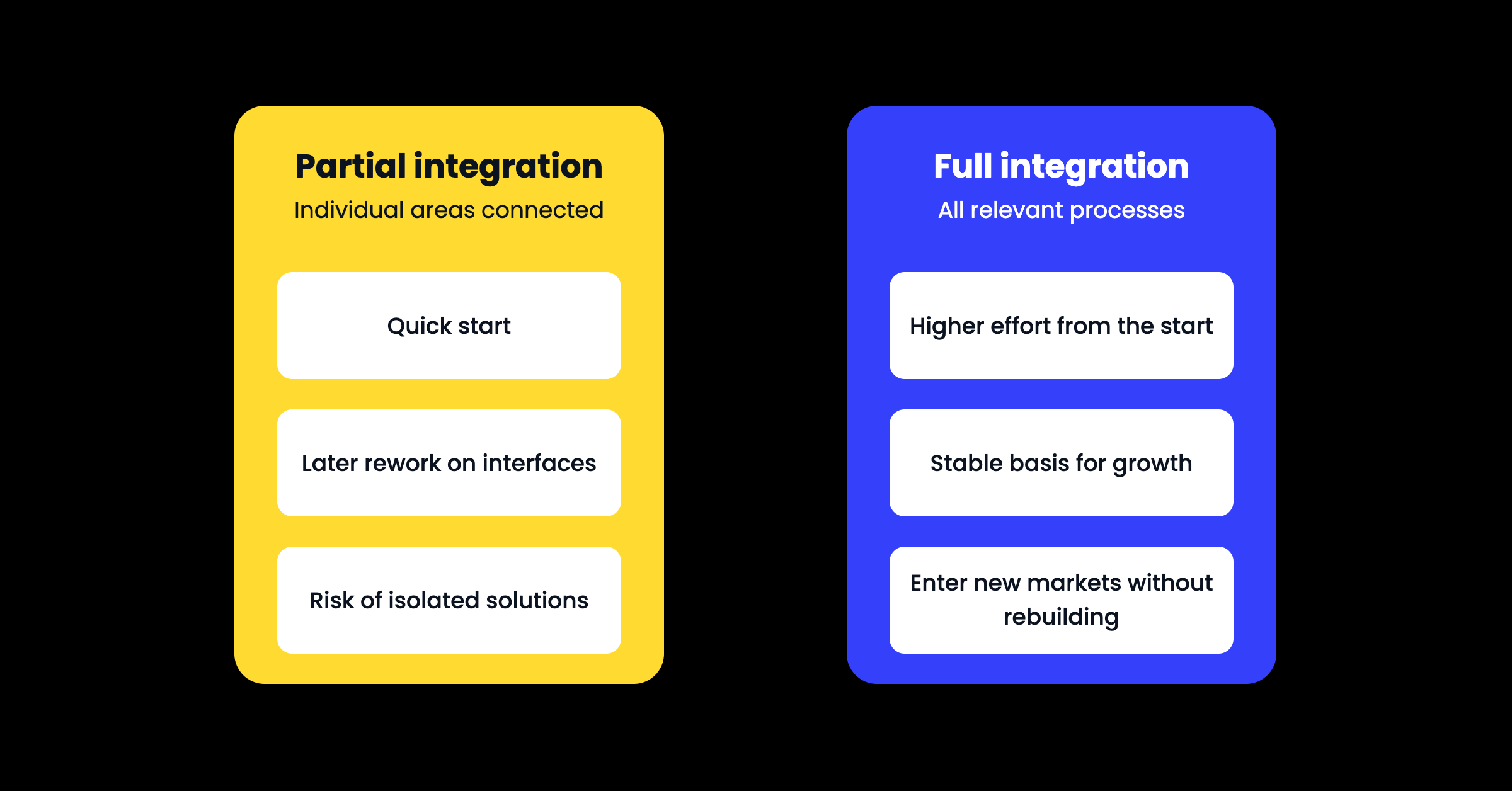
With a partial integration, only selected areas are initially connected between Shopware and Business Central, such as product data, orders, or inventory levels.
A full integration, on the other hand, connects as many relevant business processes and data flows between Shopware and Business Central as possible. In addition to products and orders, this could include customer data, prices, availability, returns, and other processes.
However, there's one important point to keep in mind: Even though a partial integration may initially seem like the quickest way to reach your goal, it can create additional work in the long run.
If you later decide to connect additional processes to the system, existing interfaces may need to be adapted and additional custom solutions developed. A well-designed full integration, by contrast, creates a stable foundation that can grow alongside your business.
That said, "well-designed" doesn't mean integrating as many features as possible simply for the sake of it. The key is to identify the processes that are genuinely relevant to your specific business model and then build them in a way that can also accommodate future requirements.
Recommended reading: MS Navision is just one of many ERP systems. Odoo is another popular choice for mid-sized businesses. We show you what connecting Shopware with this European ERP solution can look like.
To Wrap Things Up: Three Mistakes You Should Avoid When Connecting Microsoft Dynamics and Shopware
An integration between Shopware and Microsoft Dynamics can open up a whole range of new opportunities for your business. Still, you shouldn't simply get started without carefully thinking through your goals, processes, and priorities. The most important question should always be: How does this connection create real value for my business?
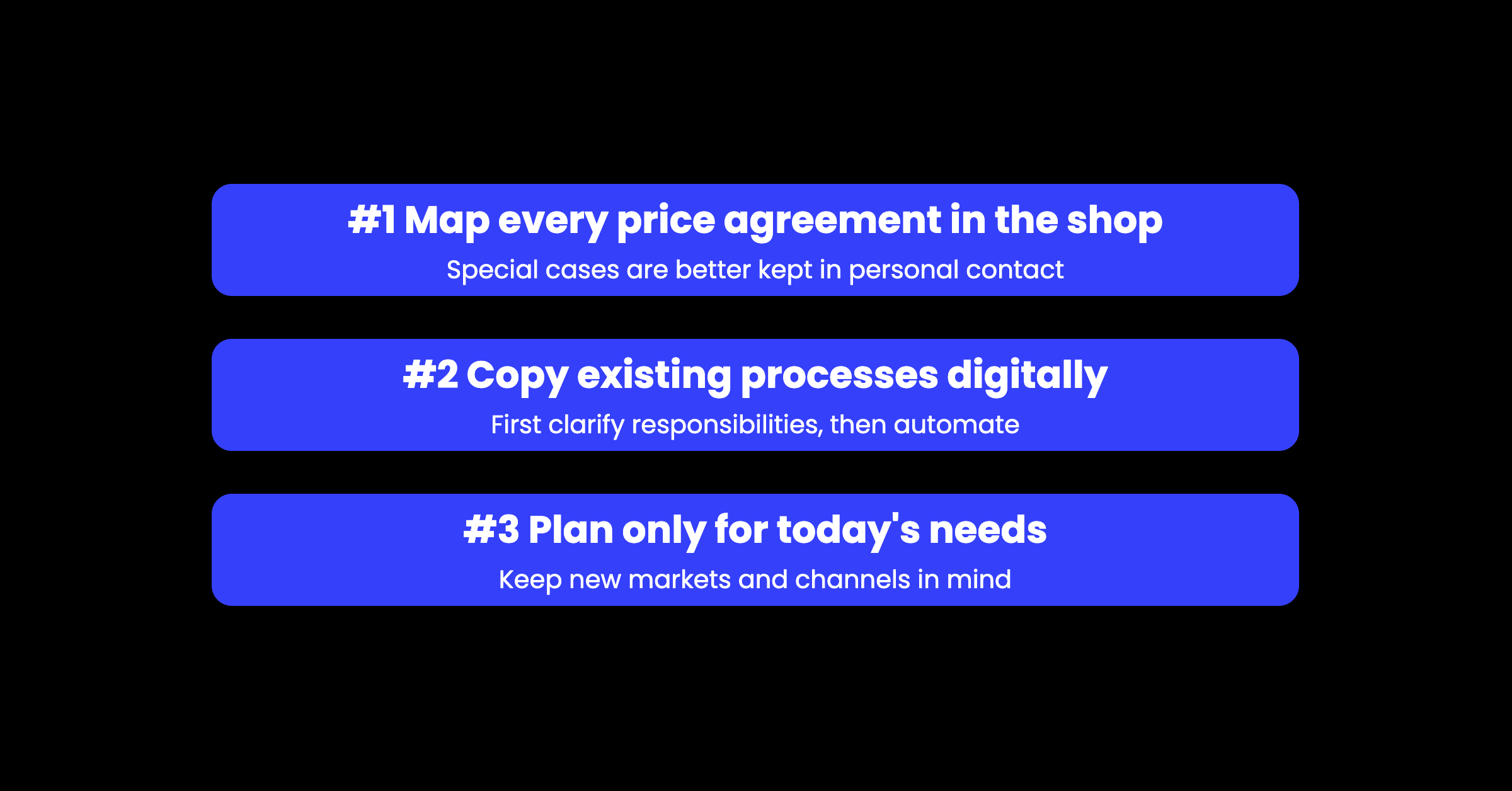
Here are three mistakes you should definitely avoid:
#1: Trying to Digitise Every Individual Pricing Agreement in the Shop
Individual terms and conditions are part and parcel of B2B commerce. Different customers have their own prices, discounts, or special agreements. It's therefore tempting to replicate every single rule in the online shop.
But that isn't always the right approach. Not every individual agreement creates real business value simply because it is digitised. Sometimes, the effort required to implement a process technically is simply greater than the actual benefit it delivers.
Before automating anything, ask yourself: How often does this situation actually occur? How much time will digitisation save? And does it genuinely improve the shopping experience for my customers?
Often, the more sensible approach is to digitise only the most important and frequent processes and deliberately leave exceptional cases where they can be handled efficiently – over the phone and through personal contact with your customers.
#2: Simply Copying Existing Processes into the Digital World
Even the best integration can't untangle a mess of convoluted processes. It can only automate what has been clearly defined beforehand. Use the opportunity to question your existing processes and make them more efficient.
Before connecting Shopware and MS Business Central, you should clarify:
- Which system is responsible for which data?
- Where are prices, products, and customer data maintained?
- Which steps in the ordering process run automatically?
- Which approvals or checks are required?
If you answer these questions systematically for every process upfront, you can often get rid of the infamous "We've always done it this way" baggage. After all, a process established in the 1990s can usually be designed far more efficiently today. In the end, you'll have a business that operates more efficiently from the ground up.
Recommended reading: One process that's often overlooked when optimising your shop is the search function in your Shopware store. We show you how to get the most out of product search in both B2C and B2B with Nosto – and boost your conversions almost as a side effect.
#3: Planning the Integration Only for Today's Needs
Another common mistake is designing the integration solely around current requirements. Everything may work smoothly today, but what happens when your business grows?
New countries, additional shops, more sales channels, and increasing order volumes all create new demands on your system landscape. And who knows what tomorrow's markets will look like, what will become the next big trend, or whether the next major shipping route will soon be blocked – whether because of someone's ego or because a captain once again decides to pull a powerslide with his cargo ship.
The point is this: A solution that works perfectly well today can quickly become a bottleneck tomorrow if it isn't designed to be extensible. A future-proof integration, on the other hand, creates the foundation for adding new processes and channels later without having to rebuild the entire system landscape.
So don't plan only for today's use case. Always consider where your business is heading next.
Shopware x Microsoft Dynamics 365 Business Central: When the Ball Starts Rolling
Overall, one thing becomes clear: Connecting Shopware with Microsoft Dynamics is about much more than a technical project. It creates the foundation B2B companies need to become more efficient, transparent, and scalable by ensuring that digital sales channels and internal business processes work together seamlessly.
Here are the key takeaways from this article:
A strong storefront needs a strong foundation: Shopware delivers the digital buying experience, while Business Central manages structured business processes behind the scenes. Together, they create a seamless and connected system landscape.
Automation starts with data: Consistent information on products, customers, prices, and inventory is the foundation for more efficient processes and better customer experiences.
B2B requirements particularly benefit from deep integration: Individual pricing conditions, complex ordering processes, and digital customer portals can be managed much more reliably when the storefront and ERP system work closely together.
A good integration doesn't just focus on today: By considering future growth from the start, companies can build an architecture that flexibly supports new markets, sales channels, and increasing business requirements.
We'd be happy to show you how such a system landscape can be implemented in practice through our successfully delivered Shopware projects. Explore our range of Commerce solutions and discover how companies are successfully evolving their digital processes.
And of course, our support goes beyond connecting Shopware and Microsoft Dynamics. Our expertise covers everything from developing custom Shopware solutions and building interfaces and integrations to providing holistic consulting for digital Commerce projects.
And if your store performs so well that Amazon, Temu, and the rest have to file for bankruptcy – who knows ... Maybe one day, the community will be talking about the miracle of the web.
FAQ – Shopware x Microsoft Dynamics 365 Business Central
Why should I connect Shopware with Microsoft Dynamics 365 Business Central?
An integration ensures that your shop and ERP system work with the same data foundation. This allows product data, prices, inventory levels, and orders to be synchronized automatically. It reduces manual work, minimizes errors, and creates the foundation for efficient business processes.
What data is exchanged between Shopware and Microsoft Dynamics 365 Business Central?
Typically, product data, customer data, prices, inventory levels, and orders are synchronized. Depending on the business model, returns, payment information, customer-specific price lists, or individual product assortments can also be included in the integration.
Can the integration also automate B2B processes?
Yes. A connection between Shopware and Microsoft Dynamics 365 Business Central enables much more than simply exchanging data. Depending on your requirements, individual price lists, customer-specific assortments, ordering and approval processes, and order transfers can all be automated.
This reduces manual effort, speeds up order processing, and ensures a consistent buying experience across all sales channels.
Is the integration also suitable for international B2B companies?
Yes. Companies operating across multiple markets, sales channels, or locations particularly benefit from a connected system landscape. The integration makes it easier to centrally manage different product assortments, pricing structures, and processes while remaining flexible enough to respond to new requirements.
Should I start with a partial integration or go for a full integration right away?
That depends on your requirements. In general, a full integration provides a stronger foundation for sustainable growth, as it helps avoid isolated solutions and costly rework later on.
However, the key is to plan the integration from the start in a way that also supports future business processes and potential extensions.