ave you ever heard the story of how NASA lost 327 million US dollars in a single mistake?
Back in 1999, the space agency launched the Mars Climate Orbiter toward the Red Planet. Everything went according to plan—until the spacecraft was supposed to enter orbit. Its trajectory was off, the orbiter approached Mars far too low, and it disintegrated in the atmosphere. Whatever survived the descent ended up crashing into the Martian surface.
The post-mortem revealed an astonishingly simple cause: one team at Lockheed Martin had provided navigation data in imperial units, while NASA—like virtually every scientific organization—expected metric values. Two systems, one interface, inconsistent data, and a multi-million-dollar disaster.
That brings us straight to the topic of this article.
Because integrating Odoo ERP with your Shopware store also means connecting two systems that need to communicate flawlessly, exchange data reliably, and work together through well-designed interfaces.
Chances are you'd rather avoid your own million-dollar integration mishap. So instead of only looking at the technical side of connecting Shopware and Odoo, we'll also explore how the combination can make your business more efficient, more scalable, and ultimately more profitable.
But let's start with a simple question.
What Is Odoo?
Odoo is an ERP (Enterprise Resource Planning) system developed in Europe. Originally born out of the open-source ecosystem, it has evolved into a comprehensive business platform used by everyone from mid-sized companies to internationally operating organizations.
Its modular architecture covers the core processes of a business in a single software ecosystem. This includes sales and CRM, inventory and warehouse management, accounting, and many other operational functions. Since all modules share the same underlying data model, information flows consistently across departments without creating isolated data silos.
Which naturally raises the next question.
Who Is Odoo For?
If we exclude highly specialized ERP solutions, there are roughly 10 to 20 major ERP platforms competing globally in the enterprise and upper mid-market space. So why should you choose Odoo?
Here are a few compelling reasons.
A Modular Platform Instead of a Monolithic ERP
Many traditional ERP systems are introduced as massive all-in-one projects, including countless features you may not need for years.
Odoo takes a different approach.
You can start with just a handful of applications—such as CRM, Accounting, or Inventory—and expand the platform gradually as your business grows.
One Shared Data Model Instead of Countless Interfaces
Every new module integrates directly into the existing platform and works with the same underlying data.
That means information only has to be entered once before becoming available everywhere it's needed. The result is less manual data maintenance, fewer disconnected processes, and—most importantly—the end of the infamous data silos.
Fast Implementation with Room to Grow
Compared to traditional ERP implementations, Odoo can usually be introduced in manageable phases.
Businesses begin with a clearly defined core setup and add new capabilities as their requirements evolve. Instead of embarking on a years-long ERP mega-project, you get a platform that grows alongside your company.
In Short: Odoo Is a Great Fit For...
...businesses that are growing, want to digitize their operations step by step, and would rather avoid a monolithic ERP implementation that takes years to complete.
Odoo is particularly well suited to mid-sized businesses, especially in B2B commerce, e-commerce, and inventory- or service-driven industries.
Its unified data model and integrated processes also make it an excellent foundation for sophisticated omnichannel strategies, where online stores, physical retail locations, marketplaces, and additional sales channels need to work together seamlessly.
Where Odoo tends to be less suitable is in large enterprise environments with highly specialized processes, global rollouts, or heavily regulated industries. In these scenarios, platforms such as SAP or Microsoft Dynamics often provide greater control and better support for extremely complex enterprise use cases.
The same applies if your organization is already deeply invested in a particular software ecosystem. For example, if your entire infrastructure revolves around Microsoft technologies, Dynamics 365 will usually integrate more naturally than introducing an external ERP platform.
Recommended reading: Still running Microsoft Navision and planning to launch or modernize your online store? We'll show you how a seamless Shopware integration works.
Shopware x Odoo: How Does the Integration Work?
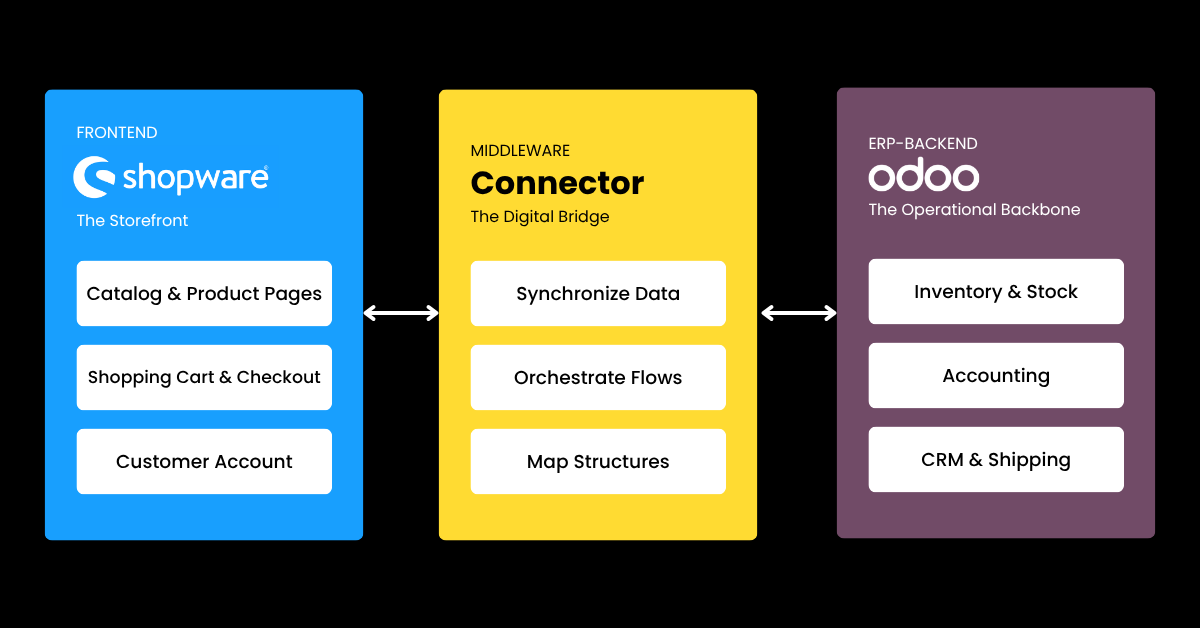
If Odoo sounds like a good fit for your business, the next logical question is how to connect it to your Shopware store.
One thing should be clear from the start: Odoo never replaces your storefront.
Whether you're selling B2B or B2C, Shopware remains the customer-facing part of your digital commerce stack. It's where customers browse products, fill their shopping carts, and complete the checkout process.
The relationship also works the other way around. If you're already using Odoo as your ERP and want to expand into e-commerce, Shopware becomes the gateway to your product catalog, providing all the commerce functionality that Odoo itself doesn't offer out of the box.
The primary goal of the integration is therefore to connect the processes between your shop and ERP while ensuring a consistent flow of data between both systems (remember the Mars orbiter). There are several ways to achieve this.
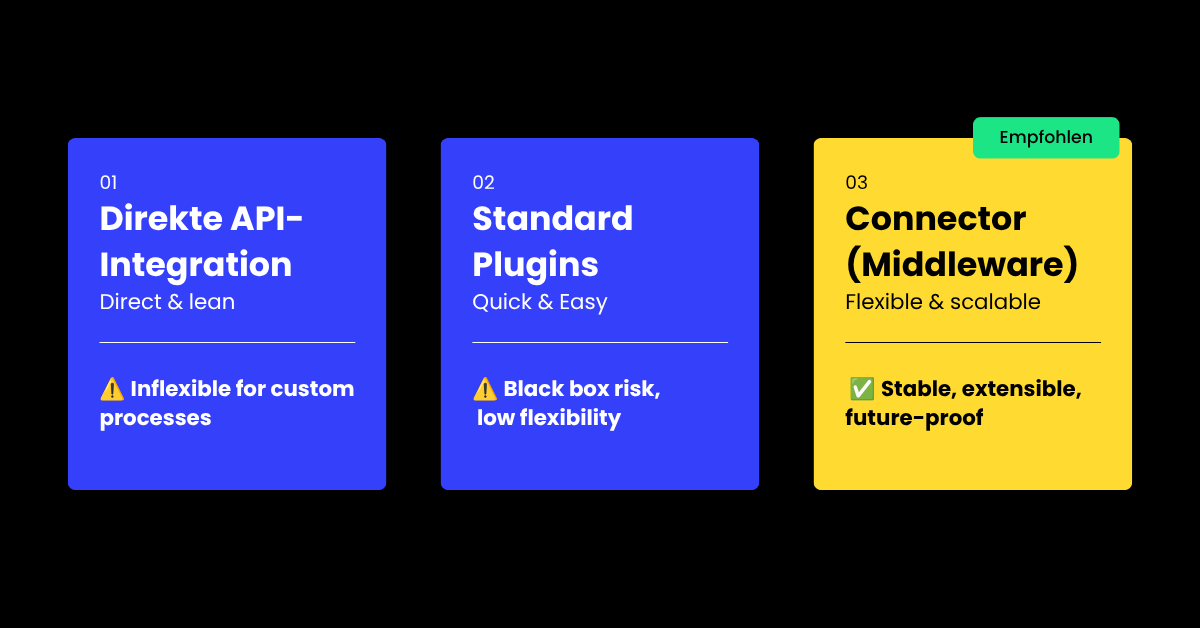
Direct API Integration
With a direct integration, Shopware and Odoo communicate with each other through their respective APIs. Data flows directly between the two systems without an intermediate layer.
At first glance, this seems like the simplest and most cost-effective option.
The downside is flexibility.
As soon as your business processes move beyond standard use cases—think custom B2B pricing structures, complex warehouse operations, or multiple sales channels—the direct connection often starts to show its limitations. At that point, either the shop or the ERP has to be adapted to fit the other system's requirements.
Standard Plugins
A second option is to use preconfigured plugins or ready-made Shopware–Odoo integrations.
These solutions are designed around common business processes and can usually be implemented relatively quickly.
However, they come with a similar drawback: limited flexibility.
In theory, standard integrations support standard processes. In practice, truly standard processes are surprisingly rare. Most companies have workflows that have evolved over many years and contain a considerable amount of business-specific logic.
When that happens, the plugin itself needs to be modified—which can become problematic if it turns out to be a black box that's difficult to customize or maintain.
Using a Connector (Middleware) as the Central Integration Layer
The third option is a connector, often referred to as middleware.
In this setup, an additional integration layer sits between Shopware and Odoo. The connector handles communication between both systems, synchronizes data, and ensures that information is transferred in the correct structure and format.
You can think of middleware as a highly capable digital interpreter—and it comes with several advantages:
- Changes made in one system don't directly impact the other.
- Data flows can be managed and monitored centrally.
- Additional systems such as PIM platforms, marketplaces, or shipping providers can be connected more easily in the future.
- Complex business logic can be implemented far more effectively than with rigid standard plugins.
A connector therefore does much more than simply establish a connection.
It creates a stable and scalable integration architecture.
For growing businesses—particularly in the B2B space—this is usually the most sustainable solution.
Recommended reading: Another valuable addition to your commerce stack is intelligent on-site search powered by Nosto. Learn how your Shopware store can benefit from it in our dedicated article.
Connecting Shopware and Odoo: Why It's Worth It
At this point, you know what Odoo is, how it differs from other ERP systems, and how it can be connected to Shopware.
But one question may still be lingering:
Why should you integrate your ERP and your online store in the first place?
The short answer is simple: because it creates measurable operational benefits.
For example:
Less Manual Data Maintenance
Product information, inventory levels, and orders no longer have to be maintained in multiple systems. Instead, data is synchronized automatically between Shopware and Odoo.
Faster and More Reliable Processes
Orders placed in your store are transferred directly into the ERP without any manual intervention.
This reduces errors while speeding up order processing.
Real-Time Inventory Visibility
Inventory levels displayed in the store always reflect current stock availability.
That means fewer overselling issues and more accurate delivery promises.
A Seamless Process from Checkout to Invoice
From the moment a customer completes checkout in Shopware to the moment an invoice is generated in Odoo, every step is connected through a single end-to-end workflow.
Better Scalability as You Grow
Increasing order volumes, additional sales channels, or expansion into new markets become much easier to manage because operational processes no longer depend on manual work.
In short, integrating your ERP and your online store makes day-to-day operations more efficient, less error-prone, and far easier to scale.
Let's take a closer look at what that means in practice.
What Data Can Be Shared Between Shopware and Odoo?

Let's start with the foundation.
Which information needs to exist consistently in both systems to ensure smooth operations?
In most cases, the relevant data falls into the following categories:
Product Master Data
Core product information such as names, descriptions, images, variants, and technical specifications.
Pricing and Commercial Terms
Sales prices, price lists, discounts, and customer-specific pricing agreements.
Inventory Data
Stock availability, warehouse locations, and inventory quantities.
Customer Data
Customer records including names, addresses, contact information, and customer group assignments.
Order Data
Orders, line items, quantities, and related transaction details.
Shipping and Delivery Information
Shipping methods, shipment statuses, and tracking information.
However, exchanging data alone doesn't create much business value.
The real benefit comes from what happens with that data.
Which leads us to the next question.
Which Processes Can Be Synchronized Between Shopware and Odoo?
We've already touched on the fact that sharing data enables automation across a wide range of business processes.
But what does that actually look like in practice?
Typically, synchronization focuses on the following end-to-end workflows.
Order Processing
Every purchase triggers a connected process.
The order is transferred into the ERP, reviewed, processed, fulfilled, and invoiced. From checkout to final billing, the entire workflow remains digitally connected.
Inventory and Procurement Management
Sales made through the store immediately affect inventory levels in the ERP.
Based on these changes, replenishment orders or internal stock transfers can be triggered automatically to maintain product availability.
Shipping and Fulfillment
Once an order is received, picking, packing, and shipping activities are managed directly within the ERP.
Status updates and shipping information are then sent back to the online store, allowing customers to track the progress of their orders.
Customer Management Across Systems
Customer data collected in the store can be enriched and reused within the ERP for customer service, sales activities, account management, and repeat orders.
The result is a consistent customer profile throughout the entire customer lifecycle.
Returns and Claims Management
Returns are processed within the ERP and automatically affect inventory, accounting, and order status information.
This keeps the entire return workflow transparent, traceable, and consistent.
Taken together, these processes ensure that Shopware and Odoo do far more than simply exchange data or automate a handful of tasks.
Instead, they create a unified software ecosystem in which operational processes extend seamlessly across system boundaries and both platforms function as a single connected solution.
Recommended reading: Are integrated processes and cross-system data exchange the same thing as EDI? And if not, what are the benefits of Electronic Data Interchange? Our guide explains everything you need to know.
Shopware x Odoo: Integration Instead of Isolated Systems
Have you ever heard the story of how NASA lost 327 million US dollars in a single mistake?
Back in 1999, the space agency launched the Mars Climate Orbiter toward the Red Planet. Everything went according to plan—until the spacecraft was supposed to enter orbit. Its trajectory was off, the orbiter approached Mars far too low, and it disintegrated in the atmosphere. Whatever survived the descent ended up crashing into the Martian surface.
The post-mortem revealed an astonishingly simple cause: one team at Lockheed Martin had provided navigation data in imperial units, while NASA—like virtually every scientific organization—expected metric values. Two systems, one interface, inconsistent data, and a multi-million-dollar disaster.
That brings us straight to the topic of this article.
Because integrating Odoo ERP with your Shopware store also means connecting two systems that need to communicate flawlessly, exchange data reliably, and work together through well-designed interfaces.
Chances are you'd rather avoid your own million-dollar integration mishap. So instead of only looking at the technical side of connecting Shopware and Odoo, we'll also explore how the combination can make your business more efficient, more scalable, and ultimately more profitable.
But let's start with a simple question.
What Is Odoo?
Odoo is an ERP (Enterprise Resource Planning) system developed in Europe. Originally born out of the open-source ecosystem, it has evolved into a comprehensive business platform used by everyone from mid-sized companies to internationally operating organizations.
Its modular architecture covers the core processes of a business in a single software ecosystem. This includes sales and CRM, inventory and warehouse management, accounting, and many other operational functions. Since all modules share the same underlying data model, information flows consistently across departments without creating isolated data silos.
Which naturally raises the next question.
Who Is Odoo For?
If we exclude highly specialized ERP solutions, there are roughly 10 to 20 major ERP platforms competing globally in the enterprise and upper mid-market space. So why should you choose Odoo?
Here are a few compelling reasons.
A Modular Platform Instead of a Monolithic ERP
Many traditional ERP systems are introduced as massive all-in-one projects, including countless features you may not need for years.
Odoo takes a different approach.
You can start with just a handful of applications—such as CRM, Accounting, or Inventory—and expand the platform gradually as your business grows.
One Shared Data Model Instead of Countless Interfaces
Every new module integrates directly into the existing platform and works with the same underlying data.
That means information only has to be entered once before becoming available everywhere it's needed. The result is less manual data maintenance, fewer disconnected processes, and—most importantly—the end of the infamous data silos.
Fast Implementation with Room to Grow
Compared to traditional ERP implementations, Odoo can usually be introduced in manageable phases.
Businesses begin with a clearly defined core setup and add new capabilities as their requirements evolve. Instead of embarking on a years-long ERP mega-project, you get a platform that grows alongside your company.
In Short: Odoo Is a Great Fit For...
...businesses that are growing, want to digitize their operations step by step, and would rather avoid a monolithic ERP implementation that takes years to complete.
Odoo is particularly well suited to mid-sized businesses, especially in B2B commerce, e-commerce, and inventory- or service-driven industries.
Its unified data model and integrated processes also make it an excellent foundation for sophisticated omnichannel strategies, where online stores, physical retail locations, marketplaces, and additional sales channels need to work together seamlessly.
Where Odoo tends to be less suitable is in large enterprise environments with highly specialized processes, global rollouts, or heavily regulated industries. In these scenarios, platforms such as SAP or Microsoft Dynamics often provide greater control and better support for extremely complex enterprise use cases.
The same applies if your organization is already deeply invested in a particular software ecosystem. For example, if your entire infrastructure revolves around Microsoft technologies, Dynamics 365 will usually integrate more naturally than introducing an external ERP platform.
Recommended reading: Still running Microsoft Navision and planning to launch or modernize your online store? We'll show you how a seamless Shopware integration works.
How Deep Should the Integration Go?
In practice, you don't have to implement every possible process from day one. The integration between Shopware and Odoo isn't an all-or-nothing proposition—it can be built up modularly over time.
For example, you might start by synchronizing only products and inventory, then gradually add pricing, orders, shipping, and other processes as your business evolves.
This kind of phased integration can make sense, especially if your existing system landscape has grown organically over the years and contains a significant amount of custom code. Connecting individual areas first reduces the initial implementation effort and allows for a more controlled rollout.
That said, our recommendation is almost always to aim for a full integration—a complete connection between Shopware and Odoo that covers everything from pricing and customer data to orders, inventory, fulfillment, and shipping.
Why?
Because partial integrations inevitably create fragmented system landscapes. Some processes become automated while others continue to rely on manual work. The result is inconsistent data, duplicate maintenance, and unnecessary operational complexity.
In other words, you're accumulating technical debt that will eventually have to be paid back.
A full integration avoids these issues by establishing a consistent data model and seamless business processes across both systems from the outset.
Three Complexity Drivers You Should Be Aware Of
While a full integration reduces complexity in the long run, there are still a few challenges that repeatedly surface in real-world ERP projects.
If they're overlooked during planning, they can significantly increase implementation effort later on.
Here are the three most common ones we encounter.
1. Marketplaces and Multiple Sales Channels (B2C)
If you're selling products not only through your own online store but also on marketplaces, social commerce platforms, or even in brick-and-mortar retail, synchronizing inventory alone won't be enough to prevent overselling.
You'll also need to think about safety stock, intelligent inventory allocation, and automated replenishment triggers that initiate purchasing once stock levels fall below predefined thresholds.
None of this is rocket science—but it's easy to overlook if the project focuses solely on exchanging data between systems instead of supporting real business operations.
Successful integrations don't just synchronize information. They model how your business actually works.
2. International Expansion: Taxes, Duties, and Multiple Entities
Operating across borders introduces another layer of complexity.
Interestingly, the ERP itself is rarely the problem. Modern ERP systems like Odoo are generally well equipped to handle international trade, multiple currencies, tax regulations, and legal entities.
The real challenge often lies in the storefront.
Your shop needs to display the correct prices, taxes, shipping costs, delivery times, and customs duties for customers in different countries. Achieving this requires careful configuration and often a surprising amount of detailed implementation work.
Once again, simply moving data from one system to another isn't enough. The customer experience has to reflect all of those business rules correctly.
3. Customer-Specific Pricing in B2B
Arguably the biggest complexity driver is customer-specific pricing.
In wholesale and B2B commerce, it's perfectly normal for every customer to negotiate individual prices, discounts, payment terms, or purchasing conditions.
Technically, all of these agreements can be synchronized between your ERP and your online store.
The better question is whether they should be.
Imagine a long-standing customer who has been placing orders over the phone for more than 40 years using a highly customized pricing structure.
Does it really make sense to spend 200 hours of development time reproducing every single pricing rule in the webshop?
Or is a short monthly phone call still the more sensible solution?
This is where the Pareto Principle becomes incredibly valuable.
Typically, around 80% of pricing scenarios can be implemented relatively easily. Whether the remaining 20% truly belongs in your online shop is often a business decision rather than a technical one.
Sometimes, pursuing absolute perfection simply isn't worth the additional complexity.
Shopware x Odoo: More Than Just an Integration
Looking back at everything we've covered, one thing becomes clear:
Connecting Shopware and Odoo isn't merely a technical implementation project—it's a strategic decision about how your business systems should work together.
The key takeaways are straightforward:
- Clearly defined roles matter. Shopware is your customer-facing commerce platform, while Odoo serves as the operational backbone of your business.
- The real value doesn't come from connecting two systems. It comes from creating end-to-end business processes built on consistent, shared data.
- A middleware connector is typically the most sustainable integration approach. Compared to direct APIs or standard plugins, it offers far greater flexibility and long-term maintainability.
- The more complete the integration, the lower the operational complexity over time. That's why we generally recommend a full integration whenever possible.
If you'd like to see what this looks like in practice, take a look at our Shopware services. There you'll find real-world project examples and typical integration architectures for mid-sized businesses.
And if Odoo is just one step in your company's digital transformation journey, there's plenty more to explore. From custom Shopware development to complex system integrations, designing scalable e-commerce ecosystems is part of our everyday work.
Once your ERP and your online store are working seamlessly together, you'll even be able to say:
"More efficient than NASA." 😉
FAQ: Shopware x Odoo
Do I need an ERP system like Odoo to run Shopware?
No. Smaller online stores can often operate successfully without an ERP system in the beginning. However, as your product catalog grows, order volumes increase, or additional sales channels are added, manual administration quickly reaches its limits. An ERP system like Odoo helps centralize business processes and significantly reduces administrative effort.
What data should be synchronized between Shopware and Odoo?
The most important data includes product information, pricing, inventory levels, customer data, orders, and shipping information. Which data is synchronized ultimately depends on your company's requirements and the business processes you want to support.
Should I fully integrate Shopware and Odoo or only connect selected processes?
Both approaches are technically possible. However, based on our experience, a full integration is almost always the better long-term solution. Partial integrations tend to create disconnected workflows, duplicate data maintenance, and unnecessary complexity. A complete integration establishes consistent data and seamless end-to-end processes across both systems.
How long does a Shopware–Odoo integration take?
There's no universal answer. Project scope, individual business requirements, and your existing system landscape all have a significant impact on the timeline. Standard integrations can often be implemented relatively quickly, while complex B2B environments or international commerce setups naturally require more planning and implementation effort.
Is Odoo suitable for complex B2B and omnichannel business models?
Yes. Companies operating multiple sales channels, customer-specific pricing models, or continuously growing business processes can benefit greatly from Odoo's modular architecture and unified data model. The key requirement is a well-planned integration that supports not only data synchronization but your complete business processes end to end.