o matter how fast the world spins deeper into the AI spiral, one of the fundamental maxims of IT still applies: The more modern and business-critical the infrastructure, the older the software behind it usually is.
Need an example? In public administration, many specialized applications are still running on Windows 7; maintenance and diagnostic software in public transport systems is sometimes even still based on Windows 2000. The picture is similar in industry: machine controls use 25-year-old software, and entire production facilities still run on Windows XP.
Are they all stuck in the past? Of course not. First of all, old software is often more reliable and predictable than bleeding-edge technology. But above all, these systems have usually grown over many years and cannot simply be replaced overnight. And while we’re talking about old Microsoft products ...
A typical case we often encounter in this context is the following: A company wants to enter e-commerce or finally relaunch its existing online store in a modern way. It chooses Shopware — while in the background, an MS Navision ERP system has already been running for many years and, naturally, needs to be connected to the e-commerce system.
In this article, we’ll show how this interaction between Shopware and Navision works. How does the technical integration happen? Where do the challenges lie? And what is our most important recommendation if you are considering a setup with Navision and Shopware yourself?
But first ...
Shopware x Navision: Who Are We Actually Talking About?
If one or both of these names are unfamiliar to you, here’s a quick introduction to the two systems.
This Is Shopware
Shopware is an e-commerce platform developed in Germany for building modern online stores. It combines a flexible storefront with a modular backend and can be individually extended via APIs.
Shopware is especially strong when it comes to flexibility, B2B scenarios, and complex product worlds. This makes the platform particularly suitable for companies that want to digitally map demanding assortments and individual purchasing processes.
This Is Navision
Navision (also known as Microsoft Dynamics NAV) is an ERP system for managing central business processes within companies. It primarily covers areas such as finance, merchandise management, purchasing, and production in one integrated solution.
Its strengths lie in its consistent process logic and the close integration of business data. This makes Navision especially suitable for mid-sized and larger companies with complex workflows that want to centrally manage and structure their operational processes.
The Crucial Point: Navision as a Legacy System
So: Shopware is a modern e-commerce platform and Navision is a powerful ERP system. And although we already mentioned it in the introduction, we want to return once again to the real crux of the matter:
No company in the world starts from scratch and says: “Let’s introduce Navision for resource management and handle our e-commerce with Shopware.” In 99.9 percent of all cases, Navision has already been there for many years, and Shopware comes later.
Why is this so important? Because Navision has grown together with the company as its ERP system. Over the years, more and more modules were added, custom solutions were developed, and the occasional workaround was built in. There is no such thing as one standardized Navision system — and what needs to be connected to Shopware is often a tangled knot of spaghetti code and confusing data structures.
Accordingly, there is no universal interface for connecting Shopware and Navision. So let’s take a look at how Navision and Shopware can actually be linked together.
Navision x Shopware – How the Integration Works
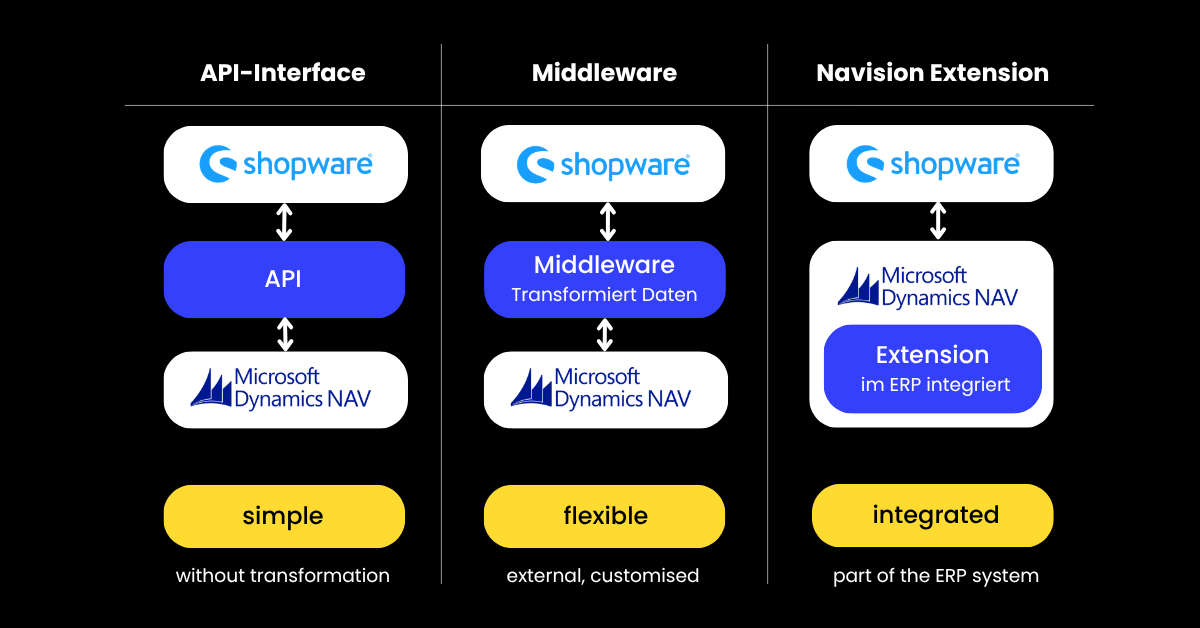
Reduced to the essentials, there are three different ways to connect Navision to a Shopware store:
Interface Between Navision and Shopware
As a comprehensive ERP system, Navision naturally comes with interfaces (APIs, Application Programming Interfaces) that allow it to communicate with external software. One important thing to understand is that an interface does not modify data — it outputs the data exactly as it receives it. In practice, however, this is often neither useful nor even system-compatible.
In principle, you can think of such an API as a simple cable: an audio signal flows from the electric guitar to the amplifier and is output by it. The sound remains exactly the way you play it on the instrument.
Middleware Between Navision and Shopware
Middleware is significantly more complex. It acts as custom-developed software positioned like an adapter between the ERP and the store. It is able to modify and prepare data exactly the way it is needed at its destination. A tiny example: The ERP writes a date as yyyy/mm/dd and the store expects the format dd/mm/yy? The middleware rewrites it.
And to stay with the analogy: If you place an effects pedal between your electric guitar and the amplifier, that would be middleware. You can adjust the output with controls and create a sound that, in extreme cases, no longer sounds like a guitar at all, but like a croaking frog.
Connection via Navision Extensions
Finally, there is the special case of Navision extensions. Strictly speaking, these are also a form of middleware, with the crucial difference that they are not externally positioned between ERP and store, but are a fixed part of the Navision infrastructure itself. These extensions are developed by third-party providers and can be installed just like any other Navision module.
In this context, Shopware has meanwhile entered into several strategic partnerships to further develop these extensions and keep them up to date. In practice, however, the following still applies: Even the best extension is not a universal out-of-the-box solution for every possible Navision setup. What you get is a framework that always needs to be adapted in detail to your specific use case.
And to complete our guitar analogy: If you take your guitar to a luthier and have an effects module installed directly into the body of the instrument, that would be the extension.
Addendum: In Which Direction Data Can (and Must) Flow
One more thing, so our guitar metaphor does not create the wrong impression: Unlike the connection between instrument and amplifier, information between store and ERP can flow bidirectionally. In practice, this is absolutely necessary, as the following example shows:
You offer an item in limited quantities and sell one unit through your online store. The store sends this information to the ERP, which reduces the inventory accordingly. The ERP then sends the updated stock level back to the shop — naturally also considering sales that may have occurred through other channels during the same timeframe.
Shopware x Navision: When Data Flows
Almost as important as the question of through which channel data flows between ERP and store is the question of when it flows. Sending every single piece of information through the lines immediately and keeping everything permanently up to date is neither performant nor practical. Generally speaking, there are three approaches:
.png)
Real-Time Data Exchange
As soon as a change occurs, the ERP or the store is informed about it. The data exchange happens automatically and within milliseconds.
Real-time synchronization makes sense whenever the updated data situation is business-critical. For example, when products are only available in very limited quantities or are delivered as make-to-order items.
Data Exchange at a Fixed Time
It is also possible to send information back and forth at a specific time, for example once every day at midnight.
This approach is useful whenever data should remain largely up to date, but does not need to be accurate down to the second. Think, for example, of products that are stocked in generous quantities. In this case, checking sales numbers once per day and updating inventory accordingly is entirely sufficient.
Data Exchange Triggered Manually
Finally, data exchange can always be triggered manually: Information is only updated once you explicitly release the process.
This approach makes sense for anything that changes only rarely or should be carefully reviewed before going live — for example price lists that are only adjusted once per quarter or updated product descriptions for your PDPs.
Interim Conclusion: How Well Does the Integration of Navision into Shopware Work?
Three ways to connect ERP and store, three different approaches for when data should flow. In practice, this allows almost every conceivable use case to be implemented. To avoid frustration and gnashing of teeth, however, the following points matter most:
Every Integration Is a Custom Build
It does not matter whether the integration is implemented via interfaces, middleware, or an extension — the case where everything works directly out of the box is extremely rare when connecting Shopware and Navision. There is simply too much that needs to be adapted and considered. So if someone tells you this is a job for a single afternoon, you are probably dealing with someone who has no idea what they are talking about.
Data Quality Is What Matters
Even the most sophisticated middleware in the world is powerless if the data it receives is roughly on the quality level of an Eastern European automobile from the Soviet era. IT people sometimes call this principle SHISHO — because if garbage goes in, only garbage can come out.
This is why it is extremely important that someone on your side understands your ERP system and prepares all data in such a way that the team responsible for the store can actually work with it. For a powerful platform like Navision, these are usually dedicated Navision consultants provided by Microsoft to its key account customers.
Navision x Shopware: Where the Pain Points Are
.png)
To sum it up once again: A complete integration of Shopware into Navision (or Navision into Shopware — depending on your perspective) is always possible if you accept that it will be a custom job and if the data quality is good. However, there are a handful of points that repeatedly cause problems:
Large Data Volumes
Experience shows that Navision does not handle large data volumes particularly well. If gigabytes of information constantly need to be moved back and forth, the system quickly starts to lag or suffer interruptions.
However, this weakness can be resolved with the necessary expertise. For example, middleware can split the data into manageable chunks and process them package by package. Have we already mentioned that there is no off-the-shelf solution for a Navision x Shopware setup?
Edge Cases
Standard processes such as invoices, orders, or customer data rarely cause issues when connecting systems. What can become problematic, however, are the edge cases — the situations that only exist in your company and nowhere else.
One example from our previous work: One of our clients has a fiscal branch in Switzerland, and all orders coming from Liechtenstein into the store must be processed through this fiscal branch. It probably goes without saying that neither Shopware nor Navision is prepared for such a scenario.
At this point, workarounds are absolutely necessary — along with experience and clear communication between everyone involved in order to identify these and similar exceptions in the first place.
Too Much Granularity in Price Lists
Especially in B2B environments, it is often the case that companies carry legacy pricing structures with them for decades. The fact that Company Müller receives a 3.2 percent discount when purchasing on Sundays and Company Schmidt receives a 3.4 percent discount on even-numbered calendar days may be manageable in Navision, but Shopware is not designed for this kind of pricing chaos.
Technically, all of this could somehow also be implemented there — but the real question is always: Does the effort justify the benefit? Or would it perhaps be better to seize the opportunity and finally establish clearly structured pricing, simply offering both Company Müller and Company Schmidt a 3.4 percent discount?
Navision x Shopware: The Final Conclusion
The technical connection between Shopware and Navision is therefore rarely the biggest problem. The actual challenge often lies elsewhere — namely in established business processes, individual special logic, and pricing and discount structures that have evolved over many years.
Especially in complex B2B setups, it quickly becomes clear that an integration does not simply exchange data between two systems. Existing processes often first need to be analyzed, simplified, or rethought so that the store and ERP can interact cleanly.
That is why it is worth working with an agency that not only masters technical integration, but also views commerce processes holistically. So if you would like to learn more about this topic, definitely take a look at our services as a Shopware partner agency as well as our additional offerings.
Oh, and don’t worry the next time you use public transportation. Windows 2000 was actually a pretty solid operating system.
FAQ – Shopware x Navision
Why is the integration of Shopware and Navision often so complex?
Because Navision has usually been individually extended over many years in most companies. Custom modules, special logic, and evolved data structures mean that there is practically never a standard solution. Every integration therefore needs to be individually planned and implemented.
Is a simple interface between Shopware and Navision enough?
Not always. APIs are suitable for exchanging data, but quickly reach their limits when data needs to be transformed, validated, or enriched. That is why middleware solutions or specially adapted extensions are often used.
Which data should be synchronized between ERP and store?
Typically, this includes inventory levels, orders, pricing, customer data, and product information. Which data needs to be synchronized in real time and which can be updated periodically depends heavily on the respective business model.
What are the most common problems in a Shopware-Navision setup?
Large data volumes, individual special cases, and historically evolved pricing and discount structures are particularly problematic. Especially in the B2B sector, existing processes often first need to be cleaned up or simplified.
What should you definitely pay attention to when choosing an integration agency?
Technical know-how alone is rarely enough. What really matters is experience with complex commerce processes, ERP structures, and data logic. A good agency does not only think in terms of interfaces, but looks at the entire interaction between shop, ERP, and business processes holistically.