n Germany alone, around 4.6 billion parcels were shipped in 2024 – and the vast majority of them reliably reach their destination. We largely have a standardized data format to thank for that: name, street, house number, postal code, city. The logic is simple and consistent enough for machines in shipping centers to understand without any trouble.
Now imagine we had never introduced an address system and were still sending our parcels to “Müller in the red house by the large lake near Neustadt.” Something like that may actually have worked a few centuries ago, but today it would quickly descend into unmanageable chaos.
If we apply this analogy to a modern e-commerce architecture, we face a similar situation: A user triggers a process – for example, by making a purchase in a Shopware store. All the resulting information now has to be transferred to the ERP system so the process can continue. But this only works if the ERP receives information it actually understands. If the store starts telling it about Müller by the lake, processing the data becomes impossible.
To ensure that an order, inventory level, or product information can reliably move from one system to another, a clear structure is needed here too. In many SAP environments, this role is handled by so-called IDocs – and that is exactly what we will take a closer look at in this article: What exactly is an IDoc? How can the format be implemented in practice? And, most importantly, what benefits do IDocs bring to e-commerce?
But first, we should talk about how Shopware and SAP actually come together – in other words, about integration.
What Does Integrating Shopware with SAP Mean, and What Are the Benefits?
Shopware and SAP serve different purposes within a company. While Shopware acts as a digital sales platform, enabling businesses to connect with customers and process their orders, SAP serves as the central system for business processes such as inventory management, purchasing, warehouse management, and financial accounting.
Without any further integration, the two systems operate completely independently. While this is technically possible, it is rarely the best solution in the long run. Without a connection, information has to be transferred manually between the ERP and the store or maintained multiple times.
Manual data transfer takes time and also increases the risk of errors: A transposed digit in an item number, an outdated inventory level, or pricing information that has not been updated can quickly lead to delays and additional effort.
Integration, on the other hand, connects Shopware and SAP. This allows the systems to exchange data automatically and play to their respective strengths: Shopware handles digital sales, while SAP manages the core business processes.
Further reading: SAP is, of course, not the only ERP system that can be integrated with Shopware. Connections with Microsoft Dynamics 365 Business Central, Odoo, or the legacy Microsoft system Navision are also possible.
What Data Can Be Transferred Through an Integration?
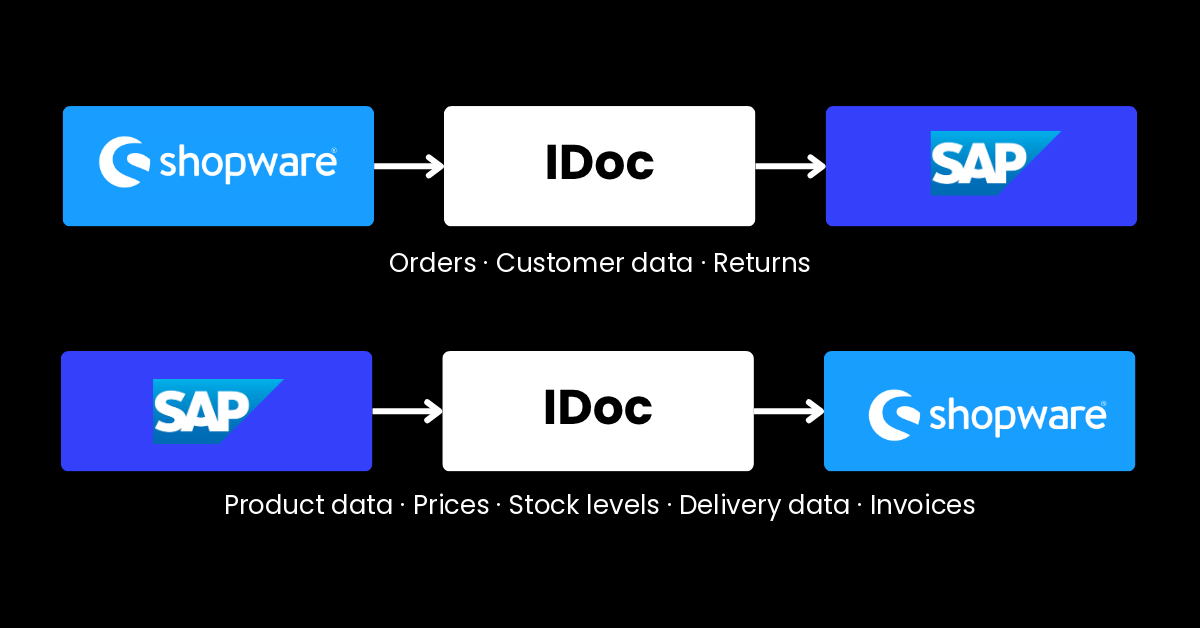
To give you an idea of the kind of information that can flow back and forth between Shopware and SAP, it is worth taking a look at the most important types of data:
- Product data: item numbers, descriptions, variants, technical specifications, or documents
- Prices and conditions: standard prices, customer-specific prices, or discounts
- Customer data: master data, customer groups, or individual settings
- Orders: order data, line items, quantities, delivery, and payment information
- Inventory levels: available quantities and current stock information
- Delivery data: shipping status, tracking information, or delivery dates
- Invoices and credit notes: important information for post-purchase processing
Which data is actually transferred will always depend on a company's individual business processes. For example, a B2B company with complex pricing structures and a large number of business customers requires different data flows than a company with a simple product range.
Further reading: Data exchange still partly relies on Electronic Data Interchange (EDI). We explain why a technology dating back to the early days of IT continues to play an important role in e-commerce.
But the real benefit of integration is not limited to exchanging information between systems – it also creates the foundation for automating a wide range of processes:
Which Processes Can Be Automated Through an Integration?
It goes without saying that process automation in day-to-day business offers even greater benefits than simply exchanging data. Here too, the specific processes involved depend on a company's individual system landscape and requirements. The possibilities are wide-ranging, and listing every possible scenario would go beyond the scope of this article. However, a few typical examples illustrate the potential an integration can offer:
- Order processing: Incoming orders from Shopware can be automatically transferred to SAP and processed further there.
- Inventory management: Stock levels can be synchronized so customers see up-to-date availability while internal teams can work with reliable data.
- Product management: New products or changes to existing products can be automatically transferred between the systems.
- Price updates: Changes to prices or customer-specific conditions can be made available in the store without manual maintenance.
- Shipping and returns: Shipping information and return statuses can be automatically exchanged between SAP and Shopware.
- Customer management: New customer data or changes to existing master data can be transferred directly to the systems where they are needed.
Integration therefore does more than simply enable Shopware and SAP to communicate with each other. It makes processes more efficient, reduces manual work, and ultimately leads to significantly higher data quality.
Further reading: Before an order usually comes the search. Find out how your Shopware store can achieve significantly better results with Nosto than with the standard search.
But what do the IDocs we mentioned at the beginning have to do with all of this?
SAP IDocs: What Are They and What Can They Do?
IDocs (short for Intermediate Documents) are a standardized message format developed by SAP that can be used to transfer business data between different systems. Put simply, an IDoc structures information in a way that allows the receiving system to process it unambiguously.
Imagine, for example, that a business customer orders several products through your Shopware store. For them, the process is complete once they click “Place order.” For your systems, however, the work is only just beginning. Even a simple order consists of a wide range of information, such as:
- Who is the customer?
- Which products were ordered?
- What quantities are required?
- Which delivery address applies?
- What prices and conditions were agreed?
This and other information must reach the SAP system correctly and be passed on to the relevant modules. Only then can SAP, for example, create an order, check inventory availability, and initiate further processing.
An IDoc ensures that the order is transferred in a standardized structure. This allows SAP to identify which piece of information belongs to which field and process the data automatically.
Put very simply, an IDoc is something like a standardized digital delivery note: Neither customers nor employees decide where each piece of information should be entered – SAP does. Of course, IDocs can transfer much more than just orders. They can also be used to exchange product data, inventory levels, prices, delivery information, or invoice data between systems.
Further reading: Another SAP development is OCI Punchout. We explain why it is often the gateway to big business in B2B e-commerce.
But somehow, that still doesn't sound all that spectacular – which raises the question:
What Advantages Do IDocs Offer Compared to Standard SAP Interfaces?
In principle, data can also be transferred between Shopware and SAP using other technologies, such as REST APIs or similar interfaces.
However, IDocs offer several particular advantages in many SAP e-commerce environments. They were specifically designed to reliably exchange business data between SAP systems and connected applications and are therefore deeply integrated into many processes.
The key benefits include:
#1: An Established Standard in the SAP Environment
IDocs have been part of SAP's standard toolkit for many years. Many companies already use them for existing processes and can build new integrations on this established foundation. Connecting a new system such as Shopware is therefore possible without having to completely redevelop existing processes.
#2: Clear Structures for Complex Processes
In B2B commerce, an order often consists of a large amount of information: customer data, products, quantities, prices, delivery conditions, or individual agreements. IDocs provide fixed structures that make it possible to represent even complex business processes clearly and unambiguously.
#3: Reliable Processing of Business Data
IDocs are designed to transfer even large volumes of business data in a structured way. If processing fails at any point, the information remains traceable and can be processed again once the issue has been resolved.
#4: Transparency When Errors Occur
Such errors can also be identified quickly. IDocs can be monitored and logged within the SAP system, allowing companies to track which data was transferred successfully and where issues occurred.
#5: Scalability for Growing Businesses
B2B companies are constantly evolving: New products are added, order volumes increase, and additional sales channels are connected. Thanks to the standardized structure of IDocs, companies can expand their system landscape without having to rely on custom solutions for every new use case.
But before you start giving your IT team a hard time and asking why you're not using IDocs, let's quickly address the following question:
Which Companies Are IDocs Suitable For – and Who Is Better Off with a Standard Connector?
Of course, IDocs are not a one-size-fits-all solution for every Shopware-SAP integration. In fact, in some cases, a standard connector may even be the better choice. Which solution is right ultimately depends primarily on a company's individual requirements.
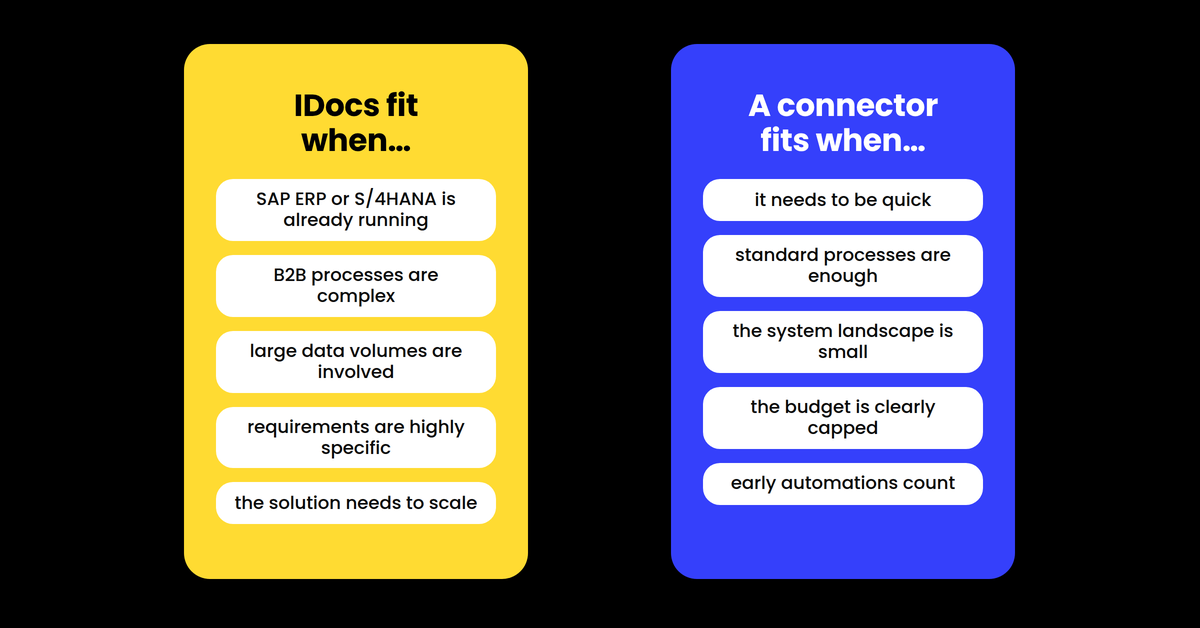
IDocs Are Particularly Suitable for Companies That …
- already use SAP ERP or SAP S/4HANA and want to expand their existing system landscape.
- need to map complex B2B processes, such as individual pricing, customer groups, approval processes, or specific order workflows.
- process large volumes of data, for example due to extensive product ranges, large numbers of business customers, or multiple sales channels.
- have individual integration requirements that go beyond standard processes.
- want to build a scalable system landscape for the long term that can grow alongside the business.
A Standard Connector Is Particularly Suitable for Companies That …
- want to quickly establish a connection between Shopware and SAP without relying on extensive custom development.
- work with standard processes and do not require highly customized business workflows.
- have a manageable system landscape where only a limited amount of data and processes need to be synchronized.
- are looking for a cost-efficient solution for a clearly defined use case.
- want to implement initial automation quickly, such as transferring orders or product data.
As is often the case, the key is finding the solution that fits your company's processes, existing system landscape, and long-term goals. And if you find yourself leaning towards the IDoc approach, one final question remains:
SAP IDocs x Shopware: How Does Integration Work in Practice?
Unfortunately, there is no fixed blueprint for integrating Shopware with SAP using IDocs. After all, every company comes with its own unique requirements. While retailer A may primarily want to synchronize orders and inventory levels, retailer B might also need customer-specific pricing, complex approval processes, or international structures …
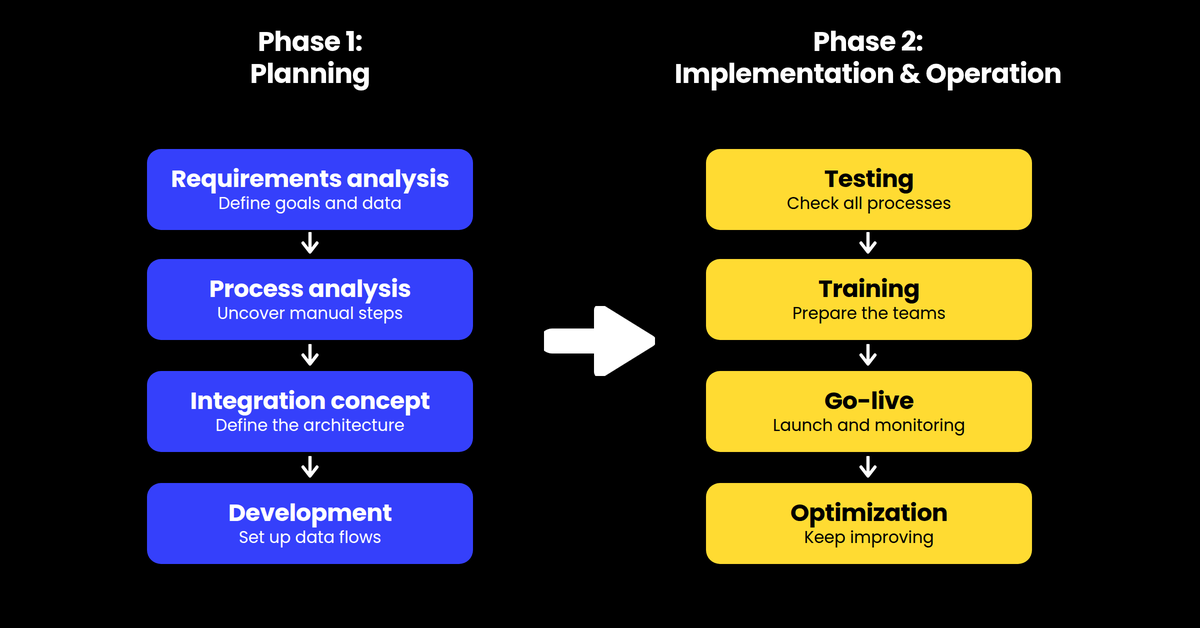
Instead, a number of best practices have become established that can help guide you through the planning and implementation process step by step:
#1: Requirements Analysis
The starting point is not the technology, but an understanding of the business processes. A requirements analysis clarifies which systems are involved, what data needs to be exchanged, and what the integration is ultimately intended to achieve.
#2: Process Analysis
Before connecting systems, existing workflows should also be examined. Where do manual steps currently occur? Which processes take up the most time? And which tasks can be made more efficient through automation?
#3: Architecture and Integration Concept
Based on these requirements, a suitable technical architecture is then developed. This includes determining which systems need to communicate with each other, what data will be transferred, and how the integration can remain scalable in the long term.
#4: Development and Implementation
Only at this stage is the integration implemented technically. The necessary connections between Shopware, SAP, and potentially other systems are established, and the defined data flows are set up.
#5: Testing and Quality Assurance
Before the integration goes live, all key processes need to be tested. Are orders, product data, and inventory levels working as intended? Are errors detected correctly? Especially when dealing with business-critical processes, a thorough testing phase is essential.
#6: Training and Preparing the Teams
Employees also need to be prepared for the new processes. Training helps them understand how workflows are changing and what benefits the integration brings to their day-to-day work. This creates understanding and acceptance before the solution is put into productive use.
#7: Go-Live and Ongoing Operations
The project does not end with the go-live. Once the integration is up and running, processes need to be monitored, errors analyzed, and the integration adapted to new requirements.
#8: Optimization and Further Development
Companies evolve: Product ranges grow, new sales channels are added, and business processes change. A good integration should therefore not only work today but also support future developments.
A Shopware-SAP integration with IDocs is therefore not a project that can be completed with a single interface. What matters is the interplay between technology, processes, and experience. That is why many companies rely on the support of experienced agencies that can guide them from the initial analysis through to ongoing operations.
With the Right Partner for a Successful Shopware-SAP Integration
So, what have we learned? Successfully integrating Shopware and SAP is not simply about technically connecting two systems. What really matters is ensuring that the technology, processes, and individual requirements of the company work together.
As an experienced Shopware partner, we are happy to support you with exactly these challenges. If you would like to see what a project like this can look like in practice, simply take a look at our successful Shopware projects.
If you would like to learn more about our other services, you will find all the relevant information on the respective page. We support you throughout the entire journey – from strategy and development to the continuous optimization of your digital business.
You can reach us at: “Strix in Frankfurt, behind the roundabout, on the avenue with all the trees, opposite Deutsche Bank” – or simply via our contact form.
FAQ: Shopware, SAP and IDocs
Why Is Integrating Shopware and SAP Useful for B2B Businesses?
Shopware and SAP perform different tasks within a company. While Shopware supports digital sales, SAP often manages core business processes such as inventory management, purchasing, or warehouse operations. An integration connects both systems and enables automatic data exchange. This helps reduce manual work, avoid errors, and make processes more efficient.
What Is an IDoc in SAP?
An IDoc (Intermediate Document) is a standardized SAP message format used to exchange business data between different systems. It ensures that information such as orders, product data, or inventory levels is transferred in a clearly defined structure and can be processed automatically.
What Data Can Be Exchanged Between Shopware and SAP Using IDocs?
A wide range of business data can be transferred using IDocs, including product information, prices, customer data, orders, inventory levels, delivery information, and invoice data. Which data is actually synchronized depends on a company's individual requirements and processes.
Are IDocs Better Than Standard Interfaces Such as REST APIs?
IDocs and modern APIs follow different approaches and each have their own strengths. While REST APIs enable flexible data exchange, IDocs are deeply integrated into many SAP processes and offer particular advantages when handling complex business transactions. Which solution is the right one depends on the existing system landscape and a company's individual requirements.
Does Every Company Using Shopware and SAP Need an IDoc Integration?
No. IDocs are particularly suitable for companies with complex processes, large volumes of data, or an established SAP landscape. For simpler requirements, a standard connector may also be the right solution. Ultimately, the key is which processes need to be automated and how the existing system architecture is structured.